
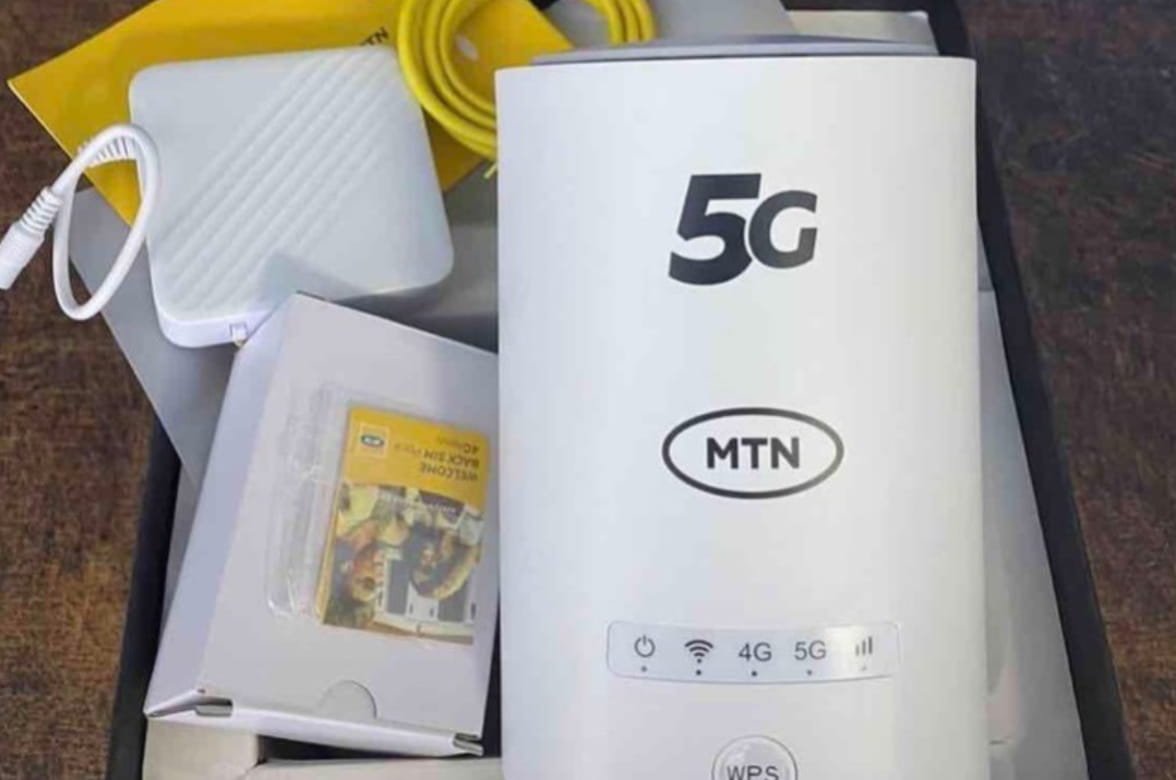
MTN ODU Price in Nigeria (2026): Latest Plans, Fees and Installation
MTN ODU price is one of the first things most buyers check before choosing MTN’s home broadband service. In Nigeria, MTN offers two unlimited ODU plans with different speed limits, monthly subscription fees and Fair Usage Policy thresholds. NetTechNg.com explains the latest MTN ODU price, installation cost, coverage, available plans and how the service compares with other broadband options.
MTN ODU gives homes and businesses access to fixed wireless broadband over the MTN network. Unlike a MiFi device that relies on a portable hotspot, the Outdoor Unit (ODU) uses an external receiver to improve signal strength and deliver broadband to an indoor Wi-Fi router.
MTN ODU Price in Nigeria (July 2026)
MTN currently offers two unlimited ODU subscription plans.
| MTN ODU Plan | Monthly Price | Advertised Speed | Validity |
| MTN Unlimited ODU 50Mbps | ₦30,000 | Up to 50Mbps | 30 Days |
| MTN Unlimited ODU 100Mbps | ₦45,000 | Up to 100Mbps | 30 Days |
Both plans provide unlimited internet access for 30 days and require an MTN ODU setup before activation. The advertised speeds represent the maximum speed available under suitable network conditions. Actual performance depends on factors such as network congestion, signal quality and coverage.
The monthly subscription covers internet service only. New customers should also budget for the ODU hardware and installation where applicable. MTN also offers separate 5G router plans with different pricing.
MTN ODU Plans and Monthly Subscription
Nigeria’s MTN has designed its ODU service for households, remote workers and businesses that need a stable broadband connection without relying on fibre infrastructure.
MTN Unlimited ODU 50Mbps Plan
The 50Mbps plan costs ₦30,000 per month and targets users with moderate to heavy internet usage.
It supports activities such as:
- Video streaming
- Online meetings
- Remote work
- Social media
- Cloud storage
- Online learning
- Multiple connected devices
The plan renews every 30 days. Customers can continue using the service by renewing before the current subscription expires.
MTN Unlimited ODU 100Mbps Plan
The 100Mbps plan costs ₦45,000 per month.
It offers a higher speed tier for users with greater bandwidth requirements, including:
- 4K video streaming
- Large file downloads
- Multi-user households
- Small offices
- Heavy cloud usage
- Gaming
- Content creation
Like the 50Mbps plan, the subscription remains valid for 30 days and requires monthly renewal.
What Is Included in the Monthly Subscription?
A monthly MTN ODU subscription provides:
- Unlimited internet access during the subscription period
- Access to the selected speed tier
- Wi-Fi connectivity for multiple devices
- Automatic renewal where enabled
The subscription does not include the cost of purchasing or installing the ODU equipment.
How to Choose the Right MTN ODU Plan
The two MTN ODU plans serve different internet needs.
Choose the 50Mbps plan if you mostly browse the web, stream videos, attend online meetings or work from home. It also handles everyday Wi-Fi use across several devices.
The 100Mbps plan is the better option for heavier internet use. It gives more bandwidth for 4K streaming, large downloads, cloud backups and homes where many people stay online throughout the day.
Don’t choose a plan based on speed alone. Think about how many devices connect to your Wi-Fi, how often you stream or download large files, and whether your internet needs are likely to grow over time. That makes it easier to pick a plan that matches your usage.
MTN ODU Installation Cost
MTN does not publish a standard installation fee for every ODU order. Confirm the latest hardware price, installation charges and any promotional offers before completing your purchase. The total cost of getting MTN ODU depends on more than the monthly subscription.
New customers may need to pay for:
- The Outdoor Unit (ODU)
- The indoor Wi-Fi router supplied with the service
- Installation by an authorised technician
- Initial activation where applicable
MTN may change device pricing or run promotional offers that reduce the upfront cost. Because hardware prices can vary over time and by availability, customers should confirm the current device cost before placing an order.
Professional installation forms part of the setup because the outdoor receiver must be mounted in a location that provides a strong network signal. Correct positioning helps the equipment achieve the best available connection for the area.
Once installation is complete, the technician connects the outdoor receiver to the indoor router, activates the service and confirms that the broadband connection is working before handing over the equipment.
What Happens After You Order MTN ODU?
Ordering an MTN ODU doesn’t mean the installation starts immediately. MTN first checks whether your address qualifies for the service.
After your order is confirmed and your address qualifies, MTN will contact you with the next steps for installation. The timeline may vary depending on your location and appointment availability. An installer mounts the Outdoor Unit where it can receive the strongest available signal. The equipment is then connected to the indoor Wi-Fi router before the service is activated.
After installation, you can connect your phones, laptops, smart TVs and other Wi-Fi devices using the network name and password provided during setup.
If the service is unavailable at your address, MTN may not proceed with the installation. Checking coverage before ordering can help you avoid unnecessary delays.
MTN ODU Coverage in Nigeria
MTN ODU works only in locations where the company has enabled the service. Before ordering the device, you should confirm that your home or office falls within a supported coverage area.
Coverage depends on several factors, including:
- Availability of the MTN 5G network
- Network capacity in your location
- Signal quality at the installation address
- Technical feasibility for the Outdoor Unit
Even if MTN offers 5G service in your city, ODU availability may differ between neighbourhoods because network capacity and infrastructure vary by location. MTN checks your address before approving a new installation.
Before you pay the MTN ODU price, confirm that the service is available at your address. MTN checks every installation request individually because eligibility depends on the exact service location.
You can request a coverage check through an MTN Service Centre, the MTN eShop or MTN Customer Care. In most cases, you’ll need to provide the address where you want the Outdoor Unit installed.
A successful coverage check means your location meets the requirements for MTN ODU installation. If the service is not yet available, you may need to wait until MTN expands coverage in your area.
MTN ODU Fair Usage Policy (FUP)
Although MTN markets the ODU plans as unlimited, both subscriptions operate under a Fair Usage Policy (FUP). This policy helps manage network performance across all users.
The usage thresholds differ by plan.
| MTN ODU Plan | Full-Speed Threshold | Speed After Threshold |
| 50Mbps Unlimited ODU | 400GB | Up to 5Mbps |
| 100Mbps Unlimited ODU | 800GB | Up to 5Mbps |
Once your data usage reaches the applicable threshold within the 30-day billing period, MTN reduces the maximum download speed to up to 5Mbps. The subscription remains active until the end of the billing cycle, and the speed resets when your next monthly plan begins.
A Fair Usage Policy does not stop your internet connection after you reach the threshold. Instead, it limits the available speed for the rest of the subscription period.
The actual browsing experience after throttling depends on how you use the connection. Basic activities such as web browsing, messaging and email generally require less bandwidth than large downloads, 4K streaming or cloud backups.
MTN ODU vs Airtel Smartbox
MTN ODU and Airtel Smartbox both target households and small businesses that want fixed wireless broadband without installing fibre. Each service combines an outdoor receiver with an indoor Wi-Fi router, but they differ in pricing, available plans and network coverage.
| Feature | MTN ODU | Airtel Smartbox |
| Network | MTN 5G | Airtel 5G |
| Monthly Plans | 50Mbps and 100Mbps Unlimited | Plans vary by package |
| Fair Usage Policy | Yes | Depends on plan |
| Installation | Professional installation | Professional installation |
| Coverage | Selected locations | Selected locations |
Your choice should depend on three practical factors:
- Availability of service at your address.
- Monthly subscription that fits your budget.
- Network performance in your location.
Checking coverage before buying is important because both providers limit installations to eligible areas with sufficient network capacity.
If both services are available at your address, compare more than the monthly subscription. Look at the speed options, Fair Usage Policy and the broadband plans each provider currently offers.
Your existing devices can also influence the decision. For example, a household that connects several phones, laptops, smart TVs and gaming consoles may have different bandwidth needs from a home that mainly uses the internet for browsing and video calls.
It’s also worth checking how each provider handles plan renewals and future upgrades. Those details can help you compare the overall service before making a purchase.
How to Buy MTN ODU in Nigeria
Buying MTN ODU begins with one question: is the service available at your address?
If the answer is yes, you can choose between the 50Mbps and 100Mbps plans. Both run for 30 days, so your choice comes down to the speed you need and your monthly budget.
After you place your order, MTN schedules an installation visit. A technician installs the Outdoor Unit, sets up the indoor Wi-Fi router and activates the connection before leaving.
Don’t stop at the monthly subscription fee. Ask for the current price of the equipment and any installation charges as well. That way, you’ll know the full cost before your installation date is confirmed.
What to Check Before Paying
The monthly subscription is only part of the total cost of getting MTN ODU. Before you place an order, confirm what you’ll pay for the equipment, installation and your chosen broadband plan.
Availability is just as important. MTN installs the service only at approved locations, so it’s worth confirming that your address is eligible before making any payment.
Take a few minutes to read the plan details as well. Compare the advertised speed, monthly subscription and Fair Usage Policy before deciding between the 50Mbps and 100Mbps options. Having those details upfront makes it easier to know exactly what you’re signing up for.
Is the ODU Worth the Price?
MTN ODU is built for people who want a fixed internet connection at home or in the office. It offers two speed options, so you can choose a plan that matches your monthly budget and internet usage.
Before you place an order, check that the service is available at your address. MTN installs the ODU only in eligible locations, so availability varies from one area to another.
You should also compare the total cost, not just the monthly subscription. The hardware, installation and monthly plan all contribute to what you’ll pay.
If you regularly stream videos, join video meetings or connect several devices to the same Wi-Fi network, compare the 50Mbps and 100Mbps plans before making a decision. Review the Fair Usage Policy as well, since both plans reduce speeds after reaching their monthly usage threshold.
Frequently Asked Questions
What is the latest MTN ODU price in Nigeria?
MTN currently offers two unlimited ODU plans:
- 50Mbps Unlimited ODU – ₦30,000 per month
- 100Mbps Unlimited ODU – ₦45,000 per month
Both subscriptions remain valid for 30 days.
Does the MTN ODU price include the device?
No. The monthly subscription pays for internet access only. If you’re a new customer, you’ll also need the ODU equipment before the service can be activated. Installation charges may apply depending on your order.
Is MTN ODU really unlimited?
Yes. You can continue using the internet throughout your 30-day subscription. However, both plans are covered by MTN’s Fair Usage Policy. After you reach the monthly usage threshold, the connection continues at a reduced speed of up to 5Mbps until your next renewal.
How often do I renew my MTN ODU plan?
MTN ODU subscriptions run for 30 days. You need to renew your plan every month to keep the service active.
Can I use MTN ODU anywhere in Nigeria?
No. MTN installs the service only in supported locations. Before you buy the device, confirm that your home or office falls within an eligible coverage area.
How many devices can connect to MTN ODU?
The indoor Wi-Fi router supports multiple connected devices at the same time. The exact number depends on the router model supplied during installation and how each device uses the connection.
How do I renew my MTN ODU subscription?
You can renew your plan through MTN’s approved broadband renewal channels once your current subscription is close to expiry or has ended.
Can I move my the ODU to another address?
You shouldn’t relocate the Outdoor Unit on your own. If you’re moving home or changing your business location, contact MTN first. The company will need to confirm that the new address supports the service before arranging another installation.
Can I change my MTN ODU plan later?
Yes. If another ODU plan is available in your area, you can contact MTN to ask about changing your current subscription. Available upgrade or downgrade options may vary.
Does MTN ODU work during a power outage?
The Outdoor Unit and indoor Wi-Fi router both require electricity. If they lose power, your internet connection will stop until power is restored or the equipment is connected to a backup power source.
What happens if my MTN ODU subscription expires?
Once your subscription expires, the broadband service becomes inactive. You can restore the connection by renewing your plan through MTN’s approved broadband channels.
Conclusion
MTN offers two unlimited ODU plans in Nigeria. The 50Mbps plan costs ₦30,000 per month, while the 100Mbps plan costs ₦45,000. Both subscriptions last for 30 days and operate under MTN’s Fair Usage Policy.
Before you subscribe, confirm that the service is available at your address. Then compare the monthly plans, check the current hardware and installation costs, and review the Fair Usage Policy. That gives you the latest information you need before placing an order.